



Google users can now say goodbye to their passwords and adopt the new security standard
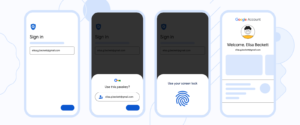
Google service users can now choose to sign in with passkeys in place of passwords and two-step verification (2SV). With this change, various forms of cybercrime aimed at stealing passwords, such as phishing attacks, can become much more difficult.
Passkeys are a more convenient and secure alternative to passwords. When you add a passkey to your Google Account, Google will now ask for it when you sign in or perform sensitive actions on your account. The passkey is stored on your local computer or mobile device, which will ask for your screen lock biometrics or PIN to confirm it's really you. Biometric data is never shared with Google or any other third party — the screen lock releases the locally stored passkey.
working by FIDO protocol, passkeys are compatible between devices from different manufacturers and different operating systems. You can use your keys from an Android phone on Windows or iOS, and vice versa.
If you use multiple devices, for example a laptop, PC or tablet, you can create a passkey for each one. This prevents you from being locked out of your account if you lose your devices, and makes it easier to upgrade from one device to another. You can also release access between devices through QR-Code.
If you lose or have stolen a device with a passkey to your Google Account and believe someone else can unlock it, you can immediately revoke the passkey in your account settings. If your device supports the option to remotely wipe it, consider doing that too, especially if your device also has passwords for other services.
Start your password-free future now! Access: g.co/passkeys